
Home - mac - 8 Hidden MacBook Features Every User Should Know
8 Hidden MacBook Features Every User Should Know

8 Hidden MacBook Features Every User Should Know

Apple’s MacBooks are among the most sought-after laptops worldwide, with around 100 million active users. They have several cutting-edge features, such as spectacular displays, sufficient storage capacity, and a long battery life. Moreover, they look great and are available in different shades. That said, many users aren’t aware of the hidden capabilities of Apple’s laptops and thus fail to unlock their full potential. Here are eight such lesser-known MacBook features to check out right away.

1. Pin a file or folder to the macOS dock
Besides frequently used apps, users can pin files and folders to the dock at the bottom of the Mac screen. To pin files and folders to the dock, one should locate the element on the Finder app, single-click it, open the “File” menu, and choose “Add to dock.” The “Add to dock” option is hidden; it appears only when one presses and holds the Shift key. One can also complete this action by pressing Ctrl + Cmd + Shift + T simultaneously on the keyboard.

2. Set up hot corners
Hot corners is a feature that enables users to perform specific actions by hovering the mouse over the corners of their MacBook screens. Users can activate this feature by selecting System Preferences > Mission Control > Hot Corners. Hot corners may be used as shortcuts for locking the screen, starting the screensaver, and other tasks.

3. Have a quick glimpse at files and folders
Opening every file and folder to check its contents can be cumbersome. MacBooks make this task easier by letting users preview files and folders from the outside without opening them. One may preview files and folders by selecting the file and pressing the spacebar. This feature can help open any file, including images, PDFs, and Microsoft Office documents.

4. Automatically have apps opened at boot
Some people customarily open certain apps every time they start up their laptops. MacBook users can adjust a few settings so these apps automatically open at boot. This option may be enabled by going to System Preferences > Users and Groups. In this menu, one should click the plus button, select the “Applications” tab, and double-click the program they would like opened on their systems as soon as they log in.

5. Double-click to minimize a window
By default, app windows automatically maximize to fit the screen size when opened. However, MacBook users can simply double-click the window’s title bar to minimize it. This feature isn’t automatically enabled; one may activate it by going to System Preferences > Dock and Menu Bar. Here, users must choose “minimize” from the dropdown menu titled “Double-click a window’s title bar to.”

6. Choose from a range of emojis using the emoji picker
MacBooks are equipped with emoji pickers, which one can easily open by pressing Cmd + Ctrl + Space simultaneously. It can also be pulled up through the menu bar. Users can enable this feature in the menu bar by selecting System Preferences > Input Sources and then clicking the “Show input menu in menu bar” checkbox. Emojis can now be viewed by selecting the “Show Emojis and Symbols” option on the menu bar.

7. Use macOS’s tool to take screenshots and record the screen
Not many know about MacBook’s built-in tool to capture screenshots and record the screen. This tool entails a host of options to take screenshots and record specific parts of the display. Users can also record screen content with the microphone and mouse pointer enabled. This app may be accessed using the shortcut Cmd + Shift + 5.

8. Use Spotlight for conversions
Users who need quick assistance with mathematical conversions need nothing but the macOS Spotlight feature. It may be opened using the shortcut “Cmd + spacebar” or by clicking the magnifying glass icon on the menu bar. Spotlight makes accurate conversions in no time, whether dollars to yen or feet to meters.

Choosing the right macOS device
Individuals can choose from a wide range of Apple laptops and desktops based on their requirements. For instance, a Mac mini is perfect for those looking for a compact but feature-filled desktop. The MacBook Pro is ideal for users looking for powerful, durable laptops for personal and/or professional use. The Mac Pro equipped with the M2 Ultra (a powerful chip 20% faster than the M1 Ultra) is a good choice for professional desktops.

One should also choose a preferred display size based on their requirements and preferences. For instance, a 14-inch MacBook, 15-inch MacBook Air, or 16-inch MacBook may be suitable for gamers requiring larger displays or those intending to watch videos on the device. In contrast, individuals requiring a sleek device for travel would be satisfied with a compact 13-inch MacBook or the Mac Mini (M2 or M2 Pro).

The Mac Studio, a great addition to Apple’s desktop collection, is perfect for a high-performance, lightning-fast experience, thanks to its M2 Ultra and M2 Max chips.

When choosing a macOS device, one must consider their requirements and budget. Learning about the hidden features discussed above is also essential to make life easier and get the most out of the device.
Latest Articles

4 hair styling tools that give a salon-like look
Beauty

4 hair styling tools that give a salon-like look

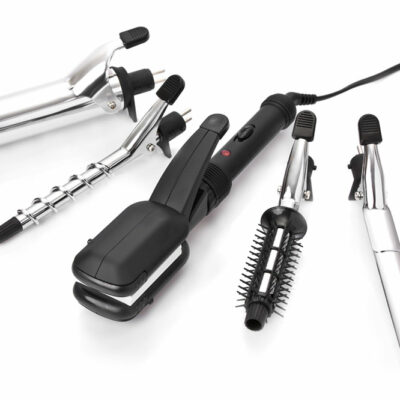
If you like to style your hair frequently without having to spend money at salons, you can invest in some basic hair styling tools. These tools can create beach waves or curls or even straighten them out. There are many hair styling tools that are versatile, easy to use, and do little or no damage to your hair. If you want to invest in hair styling tools, here are a few tools to check out: Hair straightener and curler Combining a hair straightener and curler that is suitable for all hair types allows you the freedom to try out trending hairstyles. Look for a professional straightener or curler with a ceramic or copper flat iron. Choose a flat iron that allows you to control the temperature so that you don’t damage your hair. Experts claim that setting the straightener or curler to temperatures as high as 455 degrees can help straighten the most challenging and rigid curls. The copper ceramic tools also ensure that the hair doesn’t break while you are straightening, leaving your hair straight and smooth once you are done. You can also choose regular and smart Bluetooth straighteners to help you choose the best temperature and care settings every time you use the tool. Hot air brush Hot air brushes combine a hairbrush with a flat iron and blow dryer. Choose the desired heat setting and gently brush your damp hair. It is essential to remember a hot air brush cannot be used on wet hair or right after your shower; your hair needs to be dry by at least 80%. It works well with mildly damp hair. The bristles in the hairbrush guide your hair, and the heated plates smooth and polish it. You no longer need to use a hair dryer to dry your hair after a shower and then use a straightener.
8 effective remedies for nasal polyps
Health

8 effective remedies for nasal polyps

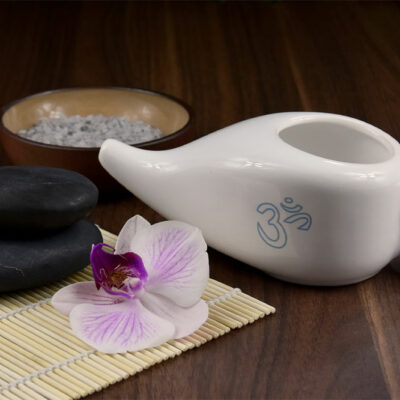
Nasal polyps are tiny tear-shaped growths in the nose and sinuses, usually brought on by asthma, infection, allergies, or other kinds of inflammation. These polyps are usually painless and non-cancerous, however, they can be big enough to cause itchiness, breathing difficulties, sneezing, and running nose. Doctors usually prescribe nasal sprays that can relieve the symptoms and get rid of the polyps. However, one can also try a few natural remedies to deal with the condition: Neti pot (or nasal irrigation) Neti pot is a popular and convenient nasal irrigation device. All one has to do is fill this container with saline solution or add 1–2 tsp salt to distilled water or boiled (and then cooled) tap water. Then, one would have to lean over a washbasin or a sink and tilt their head sideways so that the liquid does not flow back into the mouth. One would have to breathe through the mouth, insert the spout into the upper nostril and allow the fluid to drain from the lower nostril. Then the nostrils will have to be cleaned by blowing the nose to remove mucus and dirt. This process should be repeated through the other nostril. The goal is to loosen and clear the mucus and debris like dust or pollen from the nasal cavity. Using a neti pot twice a day can help improve symptoms of nasal polyps. The container and hands have to be clean and dry to prevent infection. Steam inhalation In the absence of a nasal irrigation device, one can use steam to relieve nasal congestion, headaches, and other symptoms. People can boil some water in a pot or dish, place it on a counter or the dining table right in front of them as they sit in a comfortable position, and inhale the steam for a while.
4 foods that are surprisingly bad foods for diabetics
Health

4 foods that are surprisingly bad foods for diabetics

Many foods are portrayed to be the best for diabetics, but it would be surprising to know that even wholesome foods could cause a spike in sugar levels if the portion size is not moderated. Food choices truly matter when a person has diabetes. Under normal circumstances, one would think that these foods aid in better health and maintain sugar levels, but they don’t. Here are four surprisingly bad foods for those with diabetes: Brown rice While brown rice certainly has more fiber than white rice, a single cup of brown rice contains nearly 50 grams of carbohydrates. This can easily be broken into glucose which could spike the sugar levels. The alternative would be to cut down on rice and add more green leafy vegetables. Fresh fruit juice It does not matter if one opts for seasonal juice or those that claim that they have no extra sugar added. If we take an orange as fruit and look at its nutrient content, it has about 15 grams of carbohydrates, vitamins, and fiber. An orange juice, on the contrary, has 45 grams of carbohydrates and less of other nutrients. Therefore, drinking juice is not the same thing as eating fruit.   Dried fruits If one thinks having a raisin is healthier than a chocolate cookie, think again. Raisins contain 1 gram of carb more than what is available in a chocolate cookie. That said, they are undoubtedly wholesome compared to a cookie. However, both of them would result in a spike in blood sugar. The same holds good for cranberries and apricots. Yogurt Yogurt offers a plethora of health benefits, including probiotics for gut health. However, they are heavily processed and contain a wallop of 30 grams of sugar, even in the best of the brands. Ensure to read the ingredient before buying one.