
How Bandwidth, Speed, and Latency Actually Differ — and Why It Matters for Streaming and Gaming
These three terms get used interchangeably but mean different things. Understanding them helps you diagnose performance problems faster.
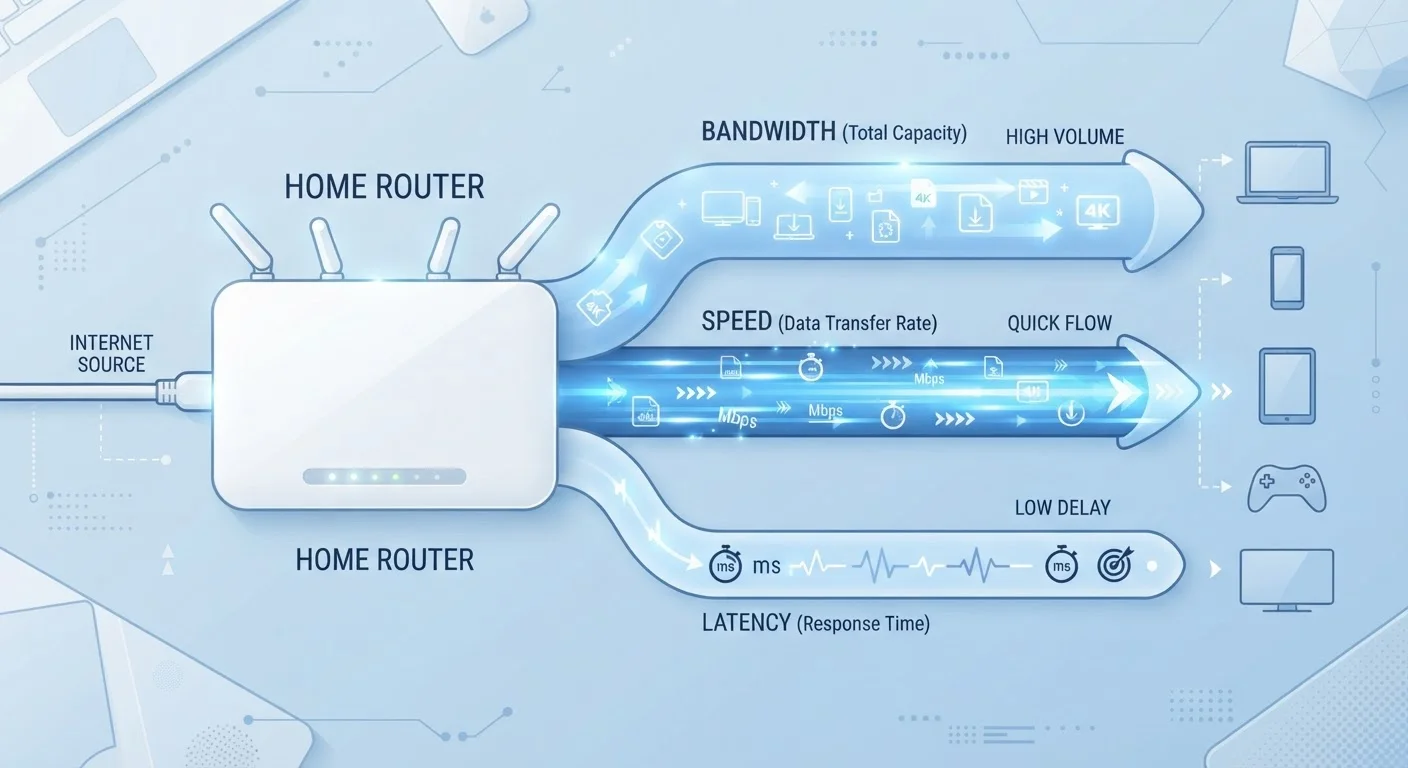
Photo: HorizonMetric.com | One Destination For Everyday Insights editorial
—— In This Article
Key Takeaways
- Bandwidth, speed, and latency are related but measure completely different things.
- High bandwidth doesn't guarantee a smooth experience if latency is high.
- Streaming video primarily needs bandwidth; online gaming primarily needs low latency.
- Your real-world speed is almost always lower than your plan's advertised bandwidth.
- Diagnosing internet problems correctly starts with knowing which metric is actually low.
Three Terms, Three Different Problems
When your video call freezes or your game lags, the instinct is to blame "the internet." But internet performance has three separate dimensions, and each points to a different cause and fix. Mixing them up means you might pay for more bandwidth when what you actually need is lower latency — or vice versa.
Think of it this way: bandwidth is the width of a highway, latency is the time it takes a car to complete one trip, and your actual speed is how many cars make it to the destination per minute under real traffic conditions. A wide highway doesn't help if every car stops at a hundred red lights.
Megabits vs. Megabytes: Easy to Confuse
Internet speeds are measured in megabits per second (Mbps), while file sizes are measured in megabytes (MB). There are 8 bits in a byte, so a 100 Mbps connection downloads roughly 12.5 megabytes per second — not 100. This distinction matters when estimating how quickly a large file will actually download.
What Bandwidth Actually Measures
Bandwidth is your connection's capacity — the theoretical ceiling of how much data can flow through it at one time. Internet service providers advertise plans in Mbps (megabits per second) or Gbps (gigabits per second). A 300 Mbps plan can move up to 300 megabits of data per second under ideal conditions.
The catch: that number is shared across everything using your connection simultaneously. Two people streaming HD video, a smart TV downloading an update, and a video call can collectively approach or exceed a modest bandwidth ceiling — even if each individual use seems light. This is why households with many devices often benefit from higher-bandwidth plans, even if no single activity seems demanding.
~25 Mbps
FCC minimum broadband download speed standard
The U.S. Federal Communications Commission has historically defined broadband as a minimum of 25 Mbps download and 3 Mbps upload, though many advocates argue this threshold no longer reflects typical household needs.
50 ms
Latency threshold for comfortable online gaming
Network engineers and gaming platforms generally consider latency under 50 milliseconds to provide a smooth, responsive gaming experience in most game genres.
15–25 Mbps
Bandwidth needed for a single 4K stream
Major streaming platforms publicly document bandwidth requirements; 4K HDR content typically demands between 15 and 25 Mbps per stream depending on the platform and compression used.
Speed: What You Actually Get vs. What You Pay For
Speed, or throughput, is what bandwidth looks like in practice after real-world conditions take their toll. Network congestion during peak hours, the age and quality of your router, the strength of your Wi-Fi signal, and even the physical distance from your router all drag actual throughput below the advertised ceiling.
Running a speed test — many free tools are available in any browser — shows your real download and upload speeds at that moment. If your test consistently shows speeds far below what your plan advertises, the bottleneck might be your equipment rather than your service. Upgrading an aging router or switching from Wi-Fi to a wired Ethernet connection often recovers significant speed without changing your plan. See how those two connection types compare in our article on wired vs. wireless home networks.
Latency: The Timing Problem That Bandwidth Can't Fix
Latency is the round-trip delay — the time between your device sending a request and receiving a response, measured in milliseconds (ms). When you press a button in an online game, latency determines how quickly the game server registers it. High latency causes the stuttering, rubber-banding, and delayed reactions that gamers call "lag."
Critically, you can have very high bandwidth and still suffer from high latency. The two metrics don't move together. Latency is influenced by the physical distance to the server, the number of network hops between you and it, and congestion on those intermediate connections — not just the width of your pipe at home. For gaming, latency consistently matters more than raw bandwidth. Most online games use relatively little data per second; they need fast, consistent communication, not large volumes of it.
Test Latency, Not Just Speed
Most free speed tests also report your ping, which is a basic latency measurement. If your download speed looks fine but you're experiencing lag or choppy calls, look at the ping number. A ping consistently above 80–100ms to a nearby server suggests a latency problem worth investigating — check your router's load, try a wired connection, or contact your provider.
Matching the Right Metric to the Right Problem
Here's a practical framework: if streaming video buffers or looks blurry, check your bandwidth and see how many devices are competing for it. If a video call feels choppy and delayed, check latency — high latency breaks the back-and-forth rhythm that real-time communication depends on. If downloads feel slow but streaming is fine, look at your upload/download balance and the health of your router.
Understanding which metric is actually low saves you from solutions that won't work. Just as mixing up RAM and storage can lead to poor device purchases — a confusion our article on RAM vs. storage covers in detail — mixing up bandwidth and latency leads to wasted money on upgraded plans that don't solve the real problem. Measure first, then fix.
Frequently Asked Questions

Technology Editorial Team
Technology Editorial Team is the collective byline for our editorial team and contributor network. Articles published under this byline or an editorial pen name are researched, written, and reviewed according to our editorial standards for clarity, consistency, and independence before publication.
View author profile